Wednesday, July 10, 2019

Express : CRUD Application by express

$ mkdir movies-app
$ cd movies-app
$ mkdir server
$ cd server
$ yarn initor$ npm init -y
$ ls
package.json
$ yarn add express body-parser cors mongoose nodemonor$ npm install express body-parser cors mongoose nodemon
  • Body Parser: Responsible to get the body off of network request.
  • Nodemon: Restart the server when it sees changes (for a better dev experience).
  • Cors: Package for providing a Connect/Express middleware that can be used to enable CORS with various options.
  • Mongoose: It's an elegant MongoDB object modeling for node.js
$ls
node_modules package.json yarn.lock
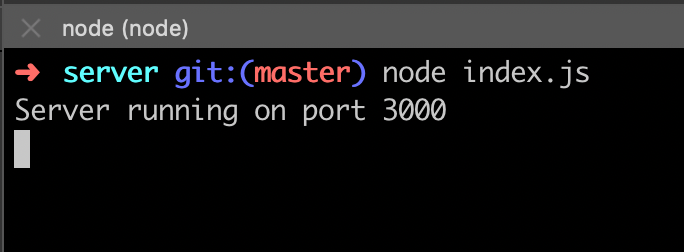
$ node index.js
Node JS application running

1.1. Installing MongoDB

For now, we need to install MongoDB. For this, just type on your terminal:
$ brew install mongodb
$ mkdir -p /data/db
$ brew services start mongodb
$ mongo
> use cinema
$ mkdir db
$ touch index.js
Updating the main file server/index.js we have something like this.
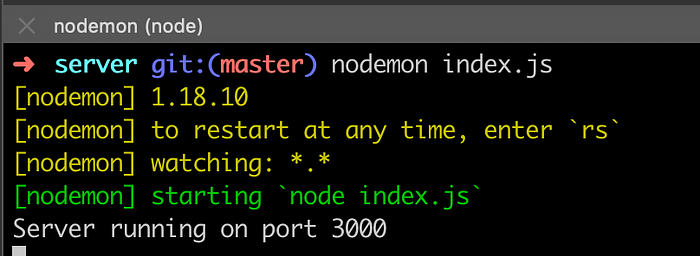
If you take a look at your terminal, you see that nothing changed. This is because when you type node index.js that means node keeps the last set up before it started. If you’d like to restart the application you need to close and open a new one. However, at the beginning of this tutorial, I told you about nodemon, it’s going to restart the server every time when it sees changes in any file of our project. From, now let’s do this.$ nodemon index.js

1.1.1. Creating Movie’s Schema

As we’ve said, we need to create an entity called movies that should be composed of the movies of a cinema. For this, we just need to know the name of the movie and the times the movie is passing on the cinema, and to add an important, but not necessary information, the rating.
$ mkdir models
$ cd models
$ touch movie-model.js

1.2. Creating routes

Here, we’ll create all the CRUD operations and create our REST endpoints. Let’s create two more folders on the server: routes and controllers. In the route folder, let’s create the file movie-router.js and in the controller folder, movie-ctrl.js.
$ mkdir routes controllers
$ touch routes/movie-router.js
$ touch controllers/movie-ctrl.js

1.3. Testing manually our application

To test our application I’d like to introduce two more tools: Postman and Robo 3T. These tools will help us in verify our application working (I won’t explain how to install because it’s easy and you can find this in their own websites).
{
    "name": "Avengers: Endgame",
    "time": ["14:15", "16:00", "21:30", "23:00"],
    "rating": 8.8
}

Saturday, July 6, 2019

Laravel : Laravel Eloquent vs query builder - Why use eloquent to decrease performance?

Yes, In some case you are right. When we've more data and almost in every site, data is not small really. Then it is better to use DB Query than the Eloquent Query.
In a performance issue of Eloquent VS DB I've heard that,
To insert 1000 rows for a simple table Eloquent takes 1.2 seconds and in that case DB facades take only 800 mili seconds(ms).
So Why then Eloquent ? Is't any necessary of that ?
Answer is - Eloquent is also necessary. Cause-
To create a better relationship and get the results in view with so much simple syntax, when there needs to join.
Eloquent is also for who have not much knowledge of SQL query.
An MVC framework follow the rules of Code Readability, Code Maintainability and which Eloquent is, you know that. A code comparison below. Obviously, Eloquent is better to read.
// In Eloquent
$student = App\Student::find($id);

// In DB facade
$student = DB::table('student')->where('id', $id)->first();
Most important part is if we want to change other database, then raw query will be a lot much headache to us and in that case Laravel Eloquent will solve all the problems with one hand. It can handle different types Database.
So when we use Eloquent and When DB facades:
  1. When we'll work on a simple and small records site with simple CRUD and there records are not fact, then use Eloquent there.
  2. When we'll work on a lot's of records, it is better to use DB Query than Eloquent.
So, finally it is cleared that - when we'll use Database Query and When we'll use Eloquent Query.
Edit - Real Life Example
  1. I'm making an University website. Which may contain maximum 5,000 teachers and 10,000 students and some notices and files. Then it is better to do this with simple Laravel Eloquent which is very much standard and readable.
  2. Now I'm making a site like Stackoverflow. Which may contains more than 1,000,0000 (1 crore) posts and many more things. I will must choose the conventional DB facades there. It is more faster for searching the posts from so much records.
You can check your query performance using Laravel Debugbar (A popular package to check Eloquent/Database query performance/ execution times)
Now it's your choice. What you want to make...

JS : Event Bubbling and Propagation

<!DOCTYPE html>
<html lang="en">
<head>
    <meta charset="UTF-8">
    <meta name="viewport" content="width=device-width, initial-scale=1.0">
    <meta http-equiv="X-UA-Compatible" content="ie=edge">
    <title>Document</title>
</head>
<body>
    <div id="m">
        <div id="d">
            <div id="p">
                <div id="s"></div>
            </div>
        </div>
    </div>
</body>
</html>

<script>
// Event Bubbling and Propagation
//  element.addEventListener( type, func, useCapture);

let m = document.getElementById('m');
let d = document.getElementById('d');
let p = document.getElementById('p');
let s = document.getElementById('s');
let log = console.log;

let highlight = (ev)=>{
    //add CSS class "gold" to the clicked element
    ev.stopPropagation();
    let target = ev.currentTarget;
    target.className = 'gold';
    reset(target);
}

let reset = (_element)=>{
    setTimeout(()=>{
        _element.className = '';
    }, 2000);
}

d.addEventListener('click', (ev)=>{
    ev.stopImmediatePropagation();
    log('Hi I\'m a DIV');
});

[m,d,p,s].forEach((element)=>{
    element.addEventListener('click', highlight);
})
</script>

Wednesday, July 3, 2019

MySql : Introduction to MySQL Stored Procedures.

Summary: in this tutorial, you will learn about MySQL stored procedures, their advantages, and disadvantages.


Definition of stored procedures

A stored procedure is a segment of declarative SQL statements stored inside the database catalog. A stored procedure can be invoked by triggers, other stored procedures, and applications such as Java, Python, PHP.
mysql stored procedure
A stored procedure that calls itself is known as a recursive stored procedure. Most database management systems support recursive stored procedures. However, MySQL does not support it very well. You should check your version of MySQL database before implementing recursive stored procedures in MySQL.

Stored Procedures in MySQL

MySQL is known as the most popular open source RDBMS which is widely used by both community and enterprise. However, during the first decade of its existence, it did not support stored procedures, stored functions, triggers, and events. Since MySQL version 5.0, those features were added to the MySQL database engine to make it more flexible and powerful.

MySQL stored procedures advantages

  • Typically, stored procedures help increase the performance of the applications. Once created, stored procedures are compiled and stored in the database. However, MySQL implements the stored procedures slightly different. MySQL stored procedures are compiled on demand. After compiling a stored procedure, MySQL puts it into a cache and maintains its own stored procedure cache for every single connection. If an application uses a stored procedure multiple times in a single connection, the compiled version is used, otherwise, the stored procedure works like a query.
  • Stored procedures help reduce the traffic between application and database server because instead of sending multiple lengthy SQL statements, the application has to send only the name and parameters of the stored procedure.
  • Stored procedures are reusable and transparent to any applications. Stored procedures expose the database interface to all applications so that developers do not have to develop functions that are already supported in stored procedures.
  • Stored procedures are secure. The database administrator can grant appropriate permissions to applications that access stored procedures in the database without giving any permissions on the underlying database tables.
Besides those advantages, stored procedures have their own disadvantages, which you should be aware of before using them in your databases.

MySQL stored procedures disadvantages

  • If you use many stored procedures, the memory usage of every connection that is using those stored procedures will increase substantially. In addition, if you overuse a large number of logical operations inside stored procedures, the CPU usage will increase because the database server is not well-designed for logical operations.
  • Stored procedure’s constructs are not designed for developing complex and flexible business logic.
  • It is difficult to debug stored procedures. Only a few database management systems allow you to debug stored procedures. Unfortunately, MySQL does not provide facilities for debugging stored procedures.
  • It is not easy to develop and maintain stored procedures. Developing and maintaining stored procedures are often required a specialized skill set that not all application developers possess. This may lead to problems in both application development and maintenance phases.
MySQL stored procedures have their own advantages and disadvantages. When you develop applications, you should decide whether or not to use stored procedures based on your application’s architecture.
In the following tutorials, we will show you how to leverage MySQL stored procedures in your database programming tasks with many practical examples.

MySQL : 10 things in MySQL (that won’t work as expected)

#10. Searching for a NULL

?
1
2
3
SELECT  *
FROM    a
WHERE   a.column = NULL
In SQL, a NULL is never equal to anything, even another NULL. This query won't return anything and in fact will be thrown out by the optimizer when building the plan.
When searching for NULL values, use this instead:
?
1
2
3
SELECT  *
FROM    a
WHERE   a.column IS NULL

#9. LEFT JOIN with additional conditions

?
1
2
3
4
5
6
SELECT  *
FROM    a
LEFT JOIN
        b
ON      b.a = a.id
WHERE   b.column = 'something'
A LEFT JOIN is like INNER JOIN except that it will return each record from a at least once, substituting missing fields from b with NULL values, if there are no actual matching records.
The WHERE condition, however, is evaluated after the LEFT JOIN so the query above checks column after it had been joined. And as we learned earlier, no NULL value can satisfy an equality condition, so the records from awithout corresponding record from b will unavoidably be filtered out.
Essentially, this query is an INNER JOIN, only less efficient.
To match only the records with b.column = 'something' (while still returning all records from a), this condition should be moved into ON clause:
?
1
2
3
4
5
6
SELECT  *
FROM    a
LEFT JOIN
        b
ON      b.a = a.id
        AND b.column = 'something'

#8. Less than a value but not a NULL

Quite often I see the queries like this:
?
1
2
3
4
5
6
7
8
9
10
11
12
13
14
15
16
17
18
19
20
21
22
23
24
25
26
27
28
29
30
31
32
33
SELECT  *
FROM    b
WHERE   b.column < 'something'
        AND b.column IS NOT NULL
&#91;/sourcecode&#93;
This is actually not an error: this query is valid and will do what's intended. However, <code>IS NOT NULL</code> here is redundant.
If <code>b.column</code> is a <code>NULL</code>, then <code>b.column < 'something'</code> will never be satisfied, since any comparison to <code>NULL</code> evaluates to a boolean <code>NULL</code> and does not pass the filter.
It is interesting that this additional <code>NULL</code> check is never used for <q>greater than</q> queries (like in <code>b.column > 'something'</code>).
This is because <code>NULL</code> go first in <code>ORDER BY</code> in <strong>MySQL</strong> and hence are incorrectly considered <q>less</q> than any other value by some people.
This query can be simplified:
SELECT  *
FROM    b
WHERE   b.column < 'something'
&#91;/sourcecode&#93;
and will still never return a <code>NULL</code> in <code>b.column</code>.
<h3 class="cracked">#7. Joining on NULL</h3>
<img src="https://explainextended.com/wp-content/uploads/2010/11/MG_3163-e1288839302867.jpg" alt="" title="Helicopter" width="700" height="467" class="aligncenter size-full wp-image-5105 noborder" />
SELECT  *
FROM    a
JOIN    b
ON      a.column = b.column
When column is nullable in both tables, this query won't return a match of two NULLs for the reasons described above: no NULLs are equal.
Here's a query to do that:
?
1
2
3
4
5
SELECT  *
FROM    a
JOIN    b
ON      a.column = b.column
        OR (a.column IS NULL AND b.column IS NULL)
MySQL's optimizer treats this as an equijoin and provides a special join condition, ref_or_null.

#6. NOT IN with NULL values

?
1
2
3
4
5
6
7
SELECT  a.*
FROM    a
WHERE   a.column NOT IN
        (
        SELECT column
        FROM    b
        )
This query will never return anything if there is but a single NULL in b.column. As with other predicates, both IN and NOT IN against NULL evaluate to NULL.
This should be rewritten using a NOT EXISTS:
?
1
2
3
4
5
6
7
8
SELECT  a.*
FROM    a
WHERE   NOT EXISTS
        (
        SELECT NULL
        FROM    b
        WHERE   b.column = a.column
        )
Unlike IN, EXISTS always evaluates to either true or false.

#5. Ordering random samples

?
1
2
3
4
5
SELECT  *
FROM    a
ORDER BY
        RAND(), column
LIMIT 10
This query attempts to select 10 random records ordered by column.
ORDER BY orders the output lexicographically: that is, the records are only ordered on the second expression when the values of the first expression are equal.
However, the results of RAND() are, well, random. It's infeasible that the values of RAND() will match, so ordering on column after RAND() is quite useless.
To order the randomly sampled records, use this query:
?
1
2
3
4
5
6
7
8
9
10
SELECT  *
FROM    (
        SELECT  *
        FROM    mytable
        ORDER BY
                RAND()
        LIMIT 10
        ) q
ORDER BY
        column

#4. Sampling arbitrary record from a group

This query intends to select one column from each group (defined by grouper)
?
1
2
SELECT  DISTINCT(grouper), a.*
FROM    a
DISTINCT is not a function, it's a part of SELECT clause. It applies to all columns in the SELECT list, and the parentheses here may just be omitted. This query may and will select the duplicates on grouper (if the values in at least one of the other columns differ).
Sometimes, it's worked around using this query (which relies on MySQL's extensions to GROUP BY):
?
1
2
3
4
SELECT  a.*
FROM    a
GROUP BY
        grouper
Unaggregated columns returned within each group are arbitrarily taken.
At first, this appears to be a nice solution, but it has quite a serious drawback. It relies on the assumption that all values returned, though taken arbitrarily from the group, will still belong to one record.
Though with current implementation is seems to be so, it's not documented and can be changed in any moment (especially if MySQL will ever learn to apply index_union after GROUP BY). So it's not safe to rely on this behavior.
This query would be easy to rewrite in a cleaner way if MySQL supported analytic functions. However, it's still possible to make do without them, if the table has a PRIMARY KEY defined:
?
1
2
3
4
5
6
7
8
9
10
11
12
13
SELECT  a.*
FROM    (
        SELECT  DISTINCT grouper
        FROM    a
        ) ao
JOIN    a
ON      a.id =
        (
        SELECT  id
        FROM    a ai
        WHERE   ai.grouper = ao.grouper
        LIMIT 1
        )

#3. Sampling first record from a group

This is a variation of the previous query:
?
1
2
3
4
5
6
SELECT  a.*
FROM    a
GROUP BY
        grouper
ORDER BY
        MIN(id) DESC
Unlike the previous query, this one attempts to select the record holding the minimal id.
Again: it is not guaranteed that the unaggregated values returned by a.* will belong to a record holding MIN(id) (or even to a single record at all).
Here's how to do it in a clean way:
?
1
2
3
4
5
6
7
8
9
10
11
12
13
14
15
SELECT  a.*
FROM    (
        SELECT  DISTINCT grouper
        FROM    a
        ) ao
JOIN    a
ON      a.id =
        (
        SELECT  id
        FROM    a ai
        WHERE   ai.grouper = ao.grouper
        ORDER BY
                ai.grouper, ai.id
        LIMIT 1
        )
This query is just like the previous one but with ORDER BY added to ensure that the first record in id order will be returned.

#2. IN and comma-separated list of values

This query attempts to match the value of column against any of those provided in a comma-separated string:
?
1
2
3
SELECT  *
FROM    a
WHERE   column IN ('1, 2, 3')
This does not work because the string is not expanded in the IN list.
Instead, if column column is a VARCHAR, it is compared (as a string) to the whole list (also as a string), and of course will never match. If column is of a numeric type, the list is cast into the numeric type as well (and only the first item will match, at best).
The correct way to deal with this query would be rewriting it as a proper IN list
?
1
2
3
SELECT  *
FROM    a
WHERE   column IN (1, 2, 3)
, or as an inline view:
?
1
2
3
4
5
6
7
8
9
10
SELECT  *
FROM    (
        SELECT  1 AS id
        UNION ALL
        SELECT  2 AS id
        UNION ALL
        SELECT  3 AS id
        ) q
JOIN    a
ON      a.column = q.id
, but this is not always possible.
To work around this without changing the query parameters, one can use FIND_IN_SET:
?
1
2
3
SELECT  *
FROM    a
WHERE   FIND_IN_SET(column, '1,2,3')
This function, however, is not sargable and a full table scan will be performed on a.

#1. LEFT JOIN with COUNT(*)

?
1
2
3
4
5
6
7
SELECT  a.id, COUNT(*)
FROM    a
LEFT JOIN
        b
ON      b.a = a.id
GROUP BY
        a.id
This query intends to count number of matches in b for each record in a.
The problem is that COUNT(*) will never return a 0 in such a query. If there is no match for a certain record in a, the record will be still returned and counted.
COUNT should be made to count only the actual records in b. Since COUNT(*), when called with an argument, ignores NULLs, we can pass b.a to it. As a join key, it can never be a null in an actual match, but will be if there were no match:
?
1
2
3
4
5
6
7
SELECT  a.id, COUNT(b.a)
FROM    a
LEFT JOIN
        b
ON      b.a = a.id
GROUP BY
        a.id