Wednesday, November 20, 2019
vue : Vue JS MultiSelect Dropdown Example
we will learn how to use multiselect dropdown box component in vue js. we can easily use vue multiselect dropdown in laravel application too. we will use vue-multiselect npm package for bootstrap vue multiple select dropdown like select tag in vue.js.
vue-multiselect package provide several options to multiselect box like :searchable, :multiple, :options, :close-on-select, :show-labels etc. vue-multiselect package amazing to use that layout is nice.
You can follow step by step commands to use multiple select dropdown box in vue js. so let's follow:

Step 1: Create Vue App
first we need to create vue cli app using bellow command:
vue create myapp
Step 2: Install vue-multiselect Package
Here we need to install vue-multiselect npm package that will allow to make http request.
npm install vue-multiselect
Read Also: Vue JS - Open link in new tab Example
Step 3: Updated HelloWorld Component
Here, we will create HelloWorld.vue component with following code.
src/components/HelloWorld.vue
link : https://www.itsolutionstuff.com/post/vue-js-multiselect-dropdown-example-example.html<template><div><h1>Vue JS MultiSelect Dropdown Example - ItSolutionStuff.com</h1><multiselectv-model="selected":multiple="true":options="options"></multiselect></div></template><script>import Multiselect from 'vue-multiselect'export default {components: { Multiselect },data () {return {selected: null,options: ['Laravel', 'Laravel 5', 'Vue JS', 'ItSolutionStuff.com', 'HDTuto.com']}}}</script><style src="vue-multiselect/dist/vue-multiselect.min.css">
vue : Laravel Vue Datatables Component Example
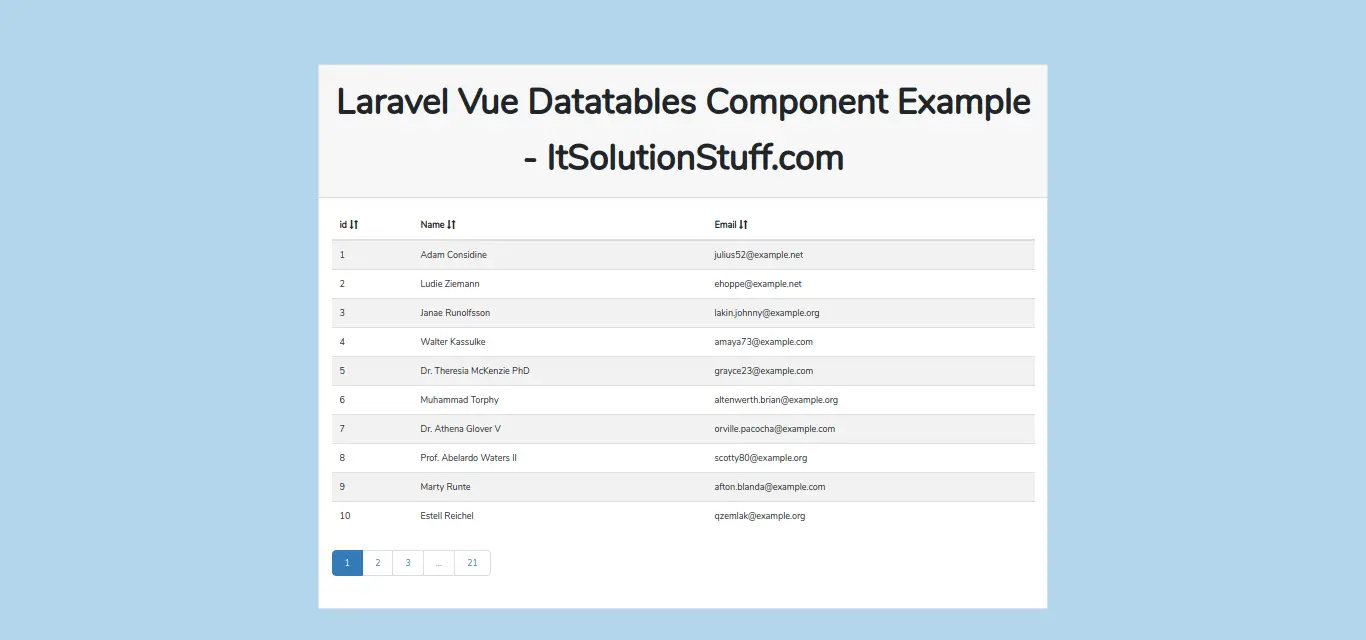
In this tutorial, i want to share with you how to implement datatables with vue js laravel. i will share simple example of vue datatable in laravel 5.8 application using vuejs-datatable npm. we will use vuejs-datatable component for vue datatables in laravel app.
datatable is more popular library in javascript. datatable provide search, sorting, pagination etc with user friendly layout. so you also want to implement datatables with vue js laravel app then this example will help you.
In this example, we will create users table with add some dummy records then we will create one route for getting all users. in vue ja code we will install vuejs-datatable package and using axios get request to get all users. Using vuejs-datatable we will display in table.
We will create step by step implementation of vue datatable using vuejs-datatable npm package with laravel. you can see following screen shot. You can also download code and check demo too.
Preview:
Step 1 : Install Laravel Fresh App
Here, we will get fresh Laravel 5.8 application using bellow command, So open your terminal OR command prompt and run bellow command:
composer create-project --prefer-dist laravel/laravel blog
Step 2: Create Route
In this step, we will create one get route and return all users data. So, let's add new route on that file.
routes/web.php
Route::get('users','UserController@index');
Step 3: Create New Controller
in this step, now we have create UserController with index method, in this method we will return all users data. So let's create controller:
app/Http/Controllers/UserController.php
<?phpnamespace App\Http\Controllers;use Illuminate\Http\Request;use App\User;class UserController extends Controller{/*** success response method.** @return \Illuminate\Http\Response*/public function index(){return response()->json(User::get());}}
Step 4: NPM Configuration and Install vuejs-datatable
In this step, we have to first add setup of vue js and then install npm, so let's run bellow command in your project.
Install vue:
php artisan preset vue
Install npm:
npm install
Install vuejs-datatable:
npm install vuejs-datatable
Step 5: Update Components
Here, we will write code on components, So let's update file and put bellow code:
resources/assets/js/components/ExampleComponent.vue
<template><div class="container"><div class="row justify-content-center"><div class="col-md-8"><div class="card"><div class="card-header">Laravel Vue Datatables Component Example - ItSolutionStuff.com</div><div class="card-body"><datatable :columns="columns" :data="rows"></datatable><datatable-pager v-model="page" type="abbreviated" :per-page="per_page"></datatable-pager></div></div></div></div></div></template><script>import DatatableFactory from 'vuejs-datatable';export default {components: { DatatableFactory },mounted() {console.log('Component mounted.')},data(){return {columns: [{label: 'id', field: 'id'},{label: 'Name', field: 'name'},{label: 'Email', field: 'email'}],rows: [],page: 1,per_page: 10,}},methods:{getUsers: function() {axios.get('/users').then(function(response){this.rows = response.data;}.bind(this));}},created: function(){this.getUsers()}}</script>
Step 6: Update welcome.blade.php
At last step, we will update our welcome.blade.php file. in this file we will use app.js file and use it, so let's update.
resources/views/welcome.blade.php
<!DOCTYPE html><html><head><meta charset="utf-8"><meta name="csrf-token" content="{{ csrf_token() }}"><meta http-equiv="X-UA-Compatible" content="IE=edge"><meta name="viewport" content="width=device-width, initial-scale=1"><title>Laravel Vue Datatables Component Example - ItSolutionStuff.com</title><link rel="stylesheet" href="https://maxcdn.bootstrapcdn.com/bootstrap/3.3.7/css/bootstrap.min.css"><link href="{{asset('css/app.css')}}" rel="stylesheet" type="text/css"></head><body><div id="app"><example-component></example-component></div><script src="{{asset('js/app.js')}}" ></script></body></html>
Now you have to run below command for update app.js file:
Read Also: Laravel Vue Router Example From Scratch
npm run dev
Now you can check our example and also check demo and download free code.
We used vuejs-datatable npm package, you can get more information from here: vuejs-datatable.
vue : Laravel Vue JS File Upload Example
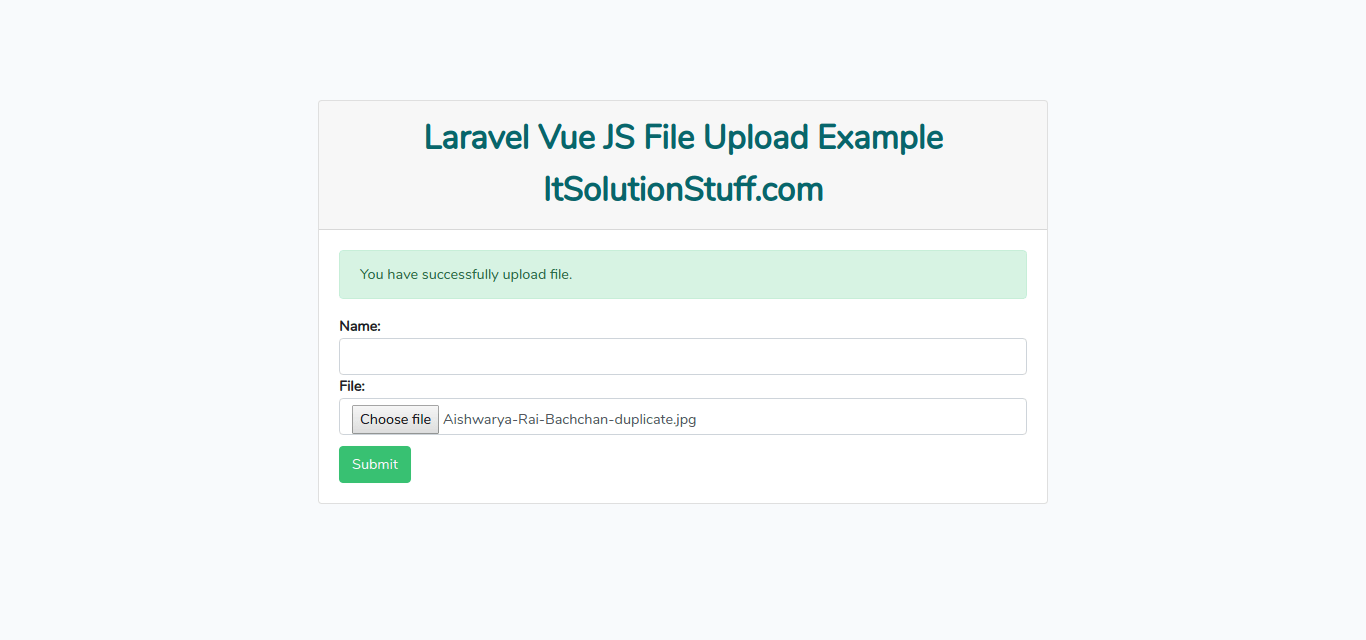
oday, we will learn file upload with laravel and vue js. we will create example of laravel vue axios file upload. we can easily fire post request using axios and pass file object as parameter, so we can store file to server using laravel 5.8.
If you are a developer, then you know about in today's web application. File upload is a primary task for every web app. The client always wants to file upload in his web application like a profile picture, product xls etc. But if you are working with vue.js then you think how it can be possible. But no issue, We will do it from scratch like install laravel, npm, vue, axios etc.
In this example, we will create a post route with a controller. In the controller method, we will write code of file upload. Then we will install npm, vue and axios. After that, we will write a code of the component. In a component file, we will write code of file upload using vue js. After finish all the step, you will get a layout like as below screenshot and you can also download code and check the demo.
Preview:
Step 1 : Install Laravel 5.8 Project
first of all, we will install Laravel 5.8 application using bellow command, So open your terminal OR command prompt and run bellow command:
composer create-project --prefer-dist laravel/laravel blog
Step 2: Create Route
In second step, we will create one post route and write file upload code. So, let's add new route on that file.
routes/web.php
Route::post('formSubmit','FileController@formSubmit');
Read Also: Laravel Vue JS Pagination Example with Demo
Step 3: Create FileController
in this step, now we have create FileController with formSubmit methods, in this method we will write code of store file on server. So let's create controller:
app/Http/Controllers/FileController.php
<?phpnamespace App\Http\Controllers;use Illuminate\Http\Request;class FileController extends Controller{/*** success response method.** @return \Illuminate\Http\Response*/public function formSubmit(Request $request){$fileName = time().'.'.$request->file->getClientOriginalExtension();$request->file->move(public_path('upload'), $fileName);return response()->json(['success'=>'You have successfully upload file.']);}}
Step 4: NPM Configuration
Here, we have to first add setup of vue js and then install npm, so let's run bellow command in your project.
Install vue:
php artisan preset vue
Install npm:
npm install
Step 5: Write on app.js and Components
In this step, we will write code on app.js and then we will create vue js components, So let's create both file and put bellow code:
resources/assets/js/app.js
require('./bootstrap');window.Vue = require('vue');Vue.component('example-component', require('./components/ExampleComponent.vue'));const app = new Vue({el: '#app'});
resources/assets/js/components/ExampleComponent.vue
<template><div class="container"><div class="row justify-content-center"><div class="col-md-8"><div class="card"><div class="card-header">Laravel Vue JS File Upload Example - ItSolutionStuff.com</div><div class="card-body"><div v-if="success != ''" class="alert alert-success" role="alert">{{success}}</div><form @submit="formSubmit" enctype="multipart/form-data"><strong>Name:</strong><input type="text" class="form-control" v-model="name"><strong>File:</strong><input type="file" class="form-control" v-on:change="onFileChange"><button class="btn btn-success">Submit</button></form></div></div></div></div></div></template><script>export default {mounted() {console.log('Component mounted.')},data() {return {name: '',file: '',success: ''};},methods: {onFileChange(e){console.log(e.target.files[0]);this.file = e.target.files[0];},formSubmit(e) {e.preventDefault();let currentObj = this;const config = {headers: { 'content-type': 'multipart/form-data' }}let formData = new FormData();formData.append('file', this.file);axios.post('/formSubmit', formData, config).then(function (response) {currentObj.success = response.data.success;}).catch(function (error) {currentObj.output = error;});}}}</script>
Step 6: Update welcome.blade.php
At last step, we will update our welcome.blade.php file. in this file we will use app.js file and use it, so let's update.
resources/views/welcome.blade.php
<!DOCTYPE html><html><head><meta charset="utf-8"><meta name="csrf-token" content="{{ csrf_token() }}"><meta http-equiv="X-UA-Compatible" content="IE=edge"><meta name="viewport" content="width=device-width, initial-scale=1"><title>Laravel Vue JS File Upload Example - ItSolutionStuff.com</title><link href="{{asset('css/app.css')}}" rel="stylesheet" type="text/css"></head><body><div id="app"><example-component></example-component></div><script src="{{asset('js/app.js')}}" ></script></body></html>
Now you have to run below command for update app.js file:
Read Also: Laravel Vue Datatables Component Example
npm run dev
Make sure you created "upload" folder on your public directory.
Link : https://www.itsolutionstuff.com/post/laravel-vue-js-file-upload-exampleexample.html
Subscribe to:
Posts (Atom)