Tuesday, March 8, 2022

Laravel Routes Tips for Laravel 8.x

 https://blog.codehunger.in/improved-laravel-routes-tips-for-laravel-8-x/


What are Routes ?

The route is a way of creating a request URL for your application. These urls do not have to map to specific files on a website. The best thing about these URLs is that they are both human-readable and SEO-friendly. In Laravel 5.5, routes are created inside the routes folder. Routes for the website are created on the web.

Route group within a group

In Routes, you can create a group within a group, assigning a certain middleware only to some URLs in the “parent” group.

PHP

Wildcard subdomains

You can create route group by dynamic subdomain name, and pass its value to every route.

PHP

What’s behind the routes?

If you use Laravel UI package, you likely want to know what routes are actually behind Auth::routes()?

You can check the file /vendor/laravel/ui/src/AuthRouteMethods.php.

PHP

The default use of that function is simply this:

PHP

But you can provide parameters to enable or disable certain routes:

PHP

Route Model Binding: You can define a key

You can do Route model binding like Route::get('api/users/{user}', function (App\User $user) { … } – but not only by ID field. If you want {user} to be a username field, put this in the model:

PHP

Quickly Navigate from Routes file to Controller

This thing was optional before Laravel 8 and became a standard main syntax of routing in Laravel 8.

Instead of routing like this:

PHP

You can specify the Controller as a class:

PHP

Then you will be able to click on PageController in PhpStorm and navigate directly to Controller, instead of searching for it manually.

Or, to make it shorter, add this to the top of the Routes file:

PHP

Route Fallback: When no Other Route is Matched

If you want to specify additional logic for not-found routes, instead of just throwing the default 404 page, you may create a special Route for that, at the very end of your Routes file.

PHP

Route Parameters Validation with RegExp

We can validate parameters directly in the route, with the “where” parameter. A pretty typical case is to prefix your routes by language locale, like fr/blog and en/article/333. How do we ensure that those two first letters are not used for some other than language?

routes/web.php:

PHP

Rate Limiting: Global and for Guests/Users

You can limit some URLs to be called a maximum of 60 times per minute, with throttle:60,1:

PHP

But also, you can do it separately for the public and for logged-in users:

PHP

Also, you can have a DB field users.rate_limit and limit the amount for a specific user:

PHP

Query string parameters to Routes

If you pass additional parameters to the route, in the array, those key / value pairs will automatically be added to the generated URL’s query string.

PHP

Separate Routes by Files

If you have a set of routes related to a certain “section”, you may separate them in a special routes/XXXXX.php file, and just include it in routes/web.php

Example with routes/auth.php in Laravel Breeze by Taylor Otwell himself:

PHP

Then, in routes/auth.php:

PHP

But you should use this include() only when that separate route file has the same settings for prefix/middlewares, otherwise it’s better to group them in app/Providers/RouteServiceProvider:

PHP

Translate Resource Verbs

If you use resource controllers, but want to change URL verbs to non-English for SEO purposes, so instead of /create you want Spanish /crear, you can configure it by using Route::resourceVerbs() method in App\Providers\RouteServiceProvider:

PHP

Custom Resource Route Names

When using Resource Controllers, in routes/web.php you can specify ->names() parameter, so the URL prefix in the browser and the route name prefix you use all over the Laravel project may be different.

PHP

So this code above will generate URLs like /p, /p/{id}, /p/{id}/edit, etc. But you would call them in the code by route('products.index'), route('products.create'), etc.

More Readable Route List

Have you ever run “php artisan route:list” and then realized that the list takes too much space and hard to read?

Here’s the solution: php artisan route:list --compact

Then it shows 3 columns instead of 6 columns: shows only Method / URI / Action.

PHP

You can also specify the exact columns you want:

php artisan route:list --columns=Method,URI,Name

PHP

Eager load relationship

If you use Route Model Binding and think you can’t use Eager Loading for relationships, think again.
So you use Route Model Binding

PHP

But you have a belongsTo relationship, and cannot use $product->with(‘category’) eager loading?
You actually can! Load the relationship with ->load()

PHP

Localizing Resource URIs

If you use resource controllers but want to change URL verbs to non-English, so instead of /create you want Spanish /crear, you can configure it with Route::resourceVerbs() method.

PHP

Resource Controllers naming

In Resource Controllers, in routes/web.php you can specify ->names() parameter, so the URL prefix and the route name prefix may be different.
This will generate URLs like /p, /p/{id}, /p/{id}/edit etc. But you would call them:

  • route(‘products.index)
  • route(‘products.create)
  • etc
PHP

Easily highlight your navbar menus

Use Route::is('route-name') to easily highlight your navbar menus

HTML

Generate absolute path using route() helper

PHP

Override the route binding resolver for each of your models

You can override the route binding resolver for each of your models. In this example, I have no control over the @ sign in the URL, so using the resolveRouteBinding method, I’m able to remove the @ sign and resolve the model.

PHP

If you need public URL but you want them to be secured

If you need public URLs but you want them to be secured, use Laravel signed URL

PHP

Using Gate in middleware method

You can use the gates you specified in App\Providers\AuthServiceProvider in middleware method.

To do this, you just need to put inside the can: and the names of the necessary gates.

PHP

Simple route with arrow function

You can use php arrow function in routing, without having to use anonymous function.

To do this, you can use fn() =>, it looks easier.

PHP

Route view

You can use Route::view($uri , $bladePage) to return a view directly, without having to use controller function.

PHP

I hope This will help you.

Validate Form Via Ajax In Laravel

 https://blog.codehunger.in/how-to-validate-form-via-ajax-in-laravel/


Route::prefix('category')->middleware('auth','acl')->group(function() {

    Route::get('/' ,'CategoryController@index')->name('category.index');

    Route::post('category/store', 'CategoryController@store')-     

    >name('category.store');

});


php artisan make:controller CategoryController


<?php


namespace Modules\Knowledgebase\Http\Controllers;


use Illuminate\Contracts\Support\Renderable;

use Illuminate\Http\Request;

use Illuminate\Routing\Controller;

use Modules\Knowledgebase\Entities\Category;


class CategoryController extends Controller

{

    /**

     * Display a listing of the resource.

     * @return Renderable

     */

    public function index()

    {

        $categories = Category::get();

        return view('knowledgebase::category.index', compact('categories'));

    }


    /**

     * Store a newly created resource in storage.

     * @param Request $request

     * @return Renderable

     */

    public function store(Request $request)

    {

        $validator = \Validator::make($request->all(), [

            'name' => 'required|regex:/^[\pL\s\-\w.]+$/u|min:3|max:100',

        ],

            [

                'required' => 'Category :attribute is required.',

            ]);

        if ($validator->fails()) {

            return response()->json([

                'success' => false,

                'errors' => $validator->getMessageBag()->toArray(),

            ]);

        }

        Category::create($request->all());

        $data = [

            'data_saved' => true,

        ];

        return response()->json($data);

    }

}


@extends('admin.layouts.app')

@section('title', __('knowledgebase::lang.category'))

@section('content')


    <div class="app-main__inner">

        <div class="row mb-2 mb-xl-3">

            <div class="col-auto d-none d-sm-block">

                <h3>{{ __('global-lang.knowledgebase-category') }}</h3>

                <hr>

            </div>

            <div class="col-auto ms-auto text-end mt-n1">

                <button type="button" class="render-create btn btn-primary btn-

                       shadow" >

                    <i class="fa fa-plus" aria-hidden="true"></i>

                    {{ __('knowledgebase::lang.create-category') }}</button>

            </div>

        </div>

        <div class="row">

            <div class="col-md-12">

                <div class="main-card mb-3 card">

                    <div class="card-body">

                        <div class="table-responsive">

                            <table class="table table-striped table-bordered"                

                             id="dataTable" width="100%" cellspacing="0">

                                <thead>

                                    <tr>

                                        <th>{{ __('knowledgebase::lang.title') 

                                         }}</th>

                                        <th>{{ 

                                          __('knowledgebase::lang.description') 

                                        }}</th>

                                        <th>{{ __('knowledgebase::lang.action') 

                                        }}</th>

                                    </tr>

                                </thead>

                                <tbody>

                                    @isset($categories)

                                        @foreach ($categories as $key => 

                                          $category)

                                            <tr>

                                                <td>{{ $category->name }}</td>

                                                <td>{{ 

                                                  substr(strip_tags($category-     

                                                  >description), 0, 50) }}</td                                                   

                                            </tr>

                                        @endforeach

                                    @endisset

                                </tbody>

                            </table>

                        </div>

                    </div>

                </div>

            </div>

        </div>

    </div>

    @push('scripts')

        <script>

            $(document).on('click', '.delete-category', function() {

                swal({

                        title: "{{ __('global-lang.are-you-sure') }}",

                        text: "{{ __('knowledgebase::lang.not-recover') }}",

                        icon: "warning",

                        buttons: true,

                        dangerMode: true,

                    })

                    .then((willDelete) => {

                        if (willDelete) {

                            id = $(this).attr('id');

                            var url = '{{ route('category.destroy', ':id') }}';

                            url = url.replace(':id', id);

                            $.ajax({

                                type: "post",

                                url: url,

                                data: {

                                    '_token': "{{ csrf_token() }}"

                                },

                                success: function(data) {

                                    swal("{{ __('knowledgebase::lang.category-

                                      deleted') }}", {

                                        icon: "success",

                                    });

                                    location.reload();

                                },

                                error: function(data) {

                                    swal("{{ __('global-lang.something-went-

                                     wrong') }}", {

                                        icon: "warning",

                                    });

                                },

                            });

                        } else {

                            swal("{{ __('knowledgebase::lang.category-not-

                              deleted') }}");

                        }

                    });

            });


            $(document).on('click', '.render-create', function() {              

                $("#open-create-modal").modal('show')

                $(".name-msg").hide();

                $(".name").removeClass("is-invalid");                    

            });


            //store script for category

            $(".submit-form").click(function(e) {

                e.preventDefault();

                var name = $("input[name='name']").val();

                var description = $('.category-description').val();

                var data = {

                    name: name,

                    description: description

                };

                axios({

                        url: "{{ route('category.store') }}",

                        method: 'POST',

                        data: data,

                    })

                    .then(function(response) {

                        if (response.data.success == false) {

                            $.each(response.data.errors, function(key, value) {

                                $('.' + key).addClass("is-invalid");

                                $('.' + key).html('');

                                $('.' + key).append('<span class="text-danger">' 

                                   + value[0] + '</span>');

                                $(".name-msg").show();

                            });

                        } else if (response.data.data_saved == true) {

                            location.reload();

                        }

                    })

            });


      </script>

    @endpush

@endsection

Monday, March 7, 2022

Download file via laravel API in Vue js


Method 1: 

<?php

namespace App\Http\Controllers;

use Illuminate\Http\Request;

class PdfController extends Controller

{

    public function index()

    {

        return view('pdf.index');

    }

    public function create()

    {

        $pdf = public_path('pdf/test.pdf');

        return response()->download($pdf);

    }

}


<template>

    <div id="app">

  <button @click="onClick()">DownLoad</button>

</div>

</template>

<script>

    import axios from 'axios'

    export default {

        methods: {

             onClick() {

            axios({

                  url: 'api/downloadPdf',

                  method: 'GET',

                  responseType: 'arraybuffer',

              }).then((response) => {

                   let blob = new Blob([response.data], {

                            type: 'application/pdf'

                        })

                        let link = document.createElement('a')

                        link.href = window.URL.createObjectURL(blob)

                        link.download = 'test.pdf'

                        link.click()

              });

          }

        }

    }

</script>


Method 2: 

Axios.post('api/scope-pdf-download', {arguments}).then(({data})=>{
var url = data.success.file;
var a = document.createElement("a");
a.href = url;
a.setAttribute('download', url.split("/").pop());
document.body.appendChild(a);
a.click();
window.URL.revokeObjectURL(url);
a.remove();
})
.catch(({response}) => {
});


  public function scopePdfDownload(Request $request)
  {
return response()->json(['success' => ['file' => env('APP_URL') . '/files/' . $pdfTitle . '.pdf']], 200);
  }

Switch Multiple PHP Versions In Ubuntu

Link : https://ostechnix.com/how-to-switch-between-multiple-php-versions-in-ubuntu/ 


This brief tutorial walks you through the steps to switch between multiple PHP versions in Ubuntu Linux and its derivatives. This guide is officially tested on Ubuntu 18.04 LTS server edition. It may work on other older or newer Ubuntu versions as well.

Introduction

Sometimes, the most recent version of an installed package might not work as you expected. Your application may not compatible with the updated package and support only a specific old version of package.


In such cases, you can simply downgrade the problematic package to its earlier working version in no time. Refer our old guides on how to downgrade a package in Ubuntu and its variants here and how to downgrade a package in Arch Linux and its derivatives here.

In some situations, you need not to downgrade the problematic packages. In Linux, we can use multiple versions of the same package at the same time, side by side.

For instance, let us say you are testing a PHP application in LAMP stack deployed in Ubuntu 18.04 LTS. After a while you find out that the application worked fine in PHP 5.6, but not in PHP 7.2 (Ubuntu 18.04 LTS installs PHP 7.x by default).

Are you going to reinstall PHP or the whole LAMP stack again? Not necessary.

You don't even have to downgrade the PHP to its earlier version. You can simply switch to the previous working PHP version in couple minutes.

1. Switch Between Multiple PHP Versions

Let us check the default installed version of PHP using command:

$ php -v

Sample output:

PHP 7.2.7-0ubuntu0.18.04.2 (cli) (built: Jul 4 2018 16:55:24) ( NTS )
Copyright (c) 1997-2018 The PHP Group
Zend Engine v3.2.0, Copyright (c) 1998-2018 Zend Technologies
with Zend OPcache v7.2.7-0ubuntu0.18.04.2, Copyright (c) 1999-2018, by Zend Technologies

As you can see, the installed version of PHP is 7.2.7.

After testing your application for couple days, you find out that your application doesn't support PHP 7.2. In that case, it is a good idea to have both PHP 5.x version and PHP 7.x version, so that you can easily switch between any supported version at any time.

You don't need to remove PHP 7.x or reinstall LAMP stack. You can use both PHP 5.x and 7.x versions together.

I assume you didn't uninstall php 5.6 in your system yet. Just in case, you removed it already, you can install it again using a PPA like below.

You can install PHP 5.6 from a PPA:

$ sudo add-apt-repository -y ppa:ondrej/php
$ sudo apt update
$ sudo apt install php5.6

1.1. Switch from PHP 7.x to PHP 5.x

1.1.1 First disable PHP 7.2 module using command:

$ sudo a2dismod php7.2

Sample output:

Module php7.2 disabled.
To activate the new configuration, you need to run:
systemctl restart apache2

1.1.2. Next, enable PHP 5.6 module:

$ sudo a2enmod php5.6

1.1.3 Set PHP 5.6 as default version using command:

$ sudo update-alternatives --set php /usr/bin/php5.6

1.1.4. Alternatively, you can run the following command to set which system wide version of PHP you want to use by default.

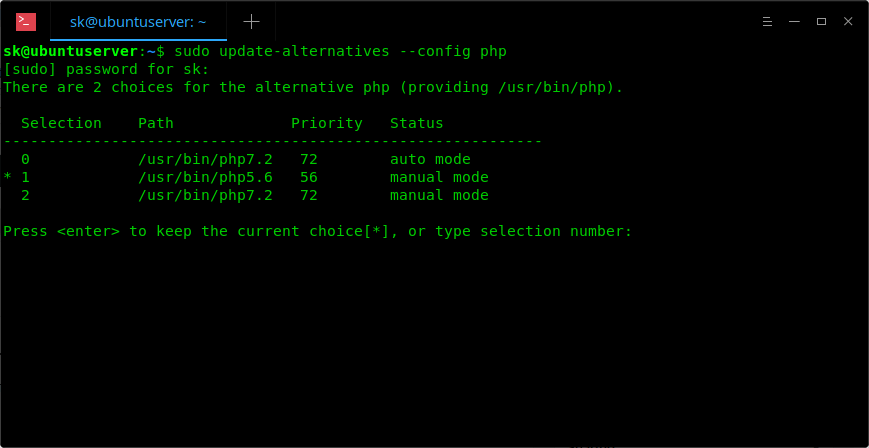
$ sudo update-alternatives --config php

1.1.5. Enter the selection number to set it as default version or simply press ENTER to keep the current choice.

Change PHP default version

1.1.6. If you have installed other PHP extensions, set them as default as well.

$ sudo update-alternatives --set phar /usr/bin/phar5.6

1.1.7. Finally, restart your Apache web server:

$ sudo systemctl restart apache2

Now, check if PHP 5.6 is the default version or not:

$ php -v

Sample output:

PHP 5.6.37-1+ubuntu18.04.1+deb.sury.org+1 (cli) 
Copyright (c) 1997-2016 The PHP Group
Zend Engine v2.6.0, Copyright (c) 1998-2016 Zend Technologies
with Zend OPcache v7.0.6-dev, Copyright (c) 1999-2016, by Zend Technologies

2. Switch from PHP 5.x to PHP 7.x

Likewise, you can switch from PHP 5.x to PHP 7.x version by running the following commands one after another.

$ sudo a2enmod php7.2
$ sudo a2dismod php5.6
$ sudo update-alternatives --set php /usr/bin/php7.2
$ sudo systemctl restart apache2

Wednesday, February 16, 2022

Code js online

 https://codesandbox.io/

Javascript/ Vue package library

https://openbase.com/ 

Image preview in vue js

 <div id="app">

  <div class="container">

    <h1>Vue.js Image Preview</h1>

    <input type="file" @change="onFileChange" accept="image/*">

    <output>

      <img :src="previewUrl" v-if="previewUrl">

      <p v-else>No image...</p>

    </output>

  </div>

</div>


var app = new Vue({
  el: '#app',
  data: {
    previewUrl: ''
  },
  methods: {
    onFileChange: function (event) {
      const file = event.target.files[0]
      if (!file) {
        return false
      }
      if (!file.type.match('image.*')) {
        return false
      }
      const reader = new FileReader()
      const that = this
      reader.onload = function (e) {
        that.previewUrl = e.target.result
      }
      reader.readAsDataURL(file)
    }
  }
})