Monday, March 7, 2022

Switch Multiple PHP Versions In Ubuntu

Link : https://ostechnix.com/how-to-switch-between-multiple-php-versions-in-ubuntu/ 


This brief tutorial walks you through the steps to switch between multiple PHP versions in Ubuntu Linux and its derivatives. This guide is officially tested on Ubuntu 18.04 LTS server edition. It may work on other older or newer Ubuntu versions as well.

Introduction

Sometimes, the most recent version of an installed package might not work as you expected. Your application may not compatible with the updated package and support only a specific old version of package.


In such cases, you can simply downgrade the problematic package to its earlier working version in no time. Refer our old guides on how to downgrade a package in Ubuntu and its variants here and how to downgrade a package in Arch Linux and its derivatives here.

In some situations, you need not to downgrade the problematic packages. In Linux, we can use multiple versions of the same package at the same time, side by side.

For instance, let us say you are testing a PHP application in LAMP stack deployed in Ubuntu 18.04 LTS. After a while you find out that the application worked fine in PHP 5.6, but not in PHP 7.2 (Ubuntu 18.04 LTS installs PHP 7.x by default).

Are you going to reinstall PHP or the whole LAMP stack again? Not necessary.

You don't even have to downgrade the PHP to its earlier version. You can simply switch to the previous working PHP version in couple minutes.

1. Switch Between Multiple PHP Versions

Let us check the default installed version of PHP using command:

$ php -v

Sample output:

PHP 7.2.7-0ubuntu0.18.04.2 (cli) (built: Jul 4 2018 16:55:24) ( NTS )
Copyright (c) 1997-2018 The PHP Group
Zend Engine v3.2.0, Copyright (c) 1998-2018 Zend Technologies
with Zend OPcache v7.2.7-0ubuntu0.18.04.2, Copyright (c) 1999-2018, by Zend Technologies

As you can see, the installed version of PHP is 7.2.7.

After testing your application for couple days, you find out that your application doesn't support PHP 7.2. In that case, it is a good idea to have both PHP 5.x version and PHP 7.x version, so that you can easily switch between any supported version at any time.

You don't need to remove PHP 7.x or reinstall LAMP stack. You can use both PHP 5.x and 7.x versions together.

I assume you didn't uninstall php 5.6 in your system yet. Just in case, you removed it already, you can install it again using a PPA like below.

You can install PHP 5.6 from a PPA:

$ sudo add-apt-repository -y ppa:ondrej/php
$ sudo apt update
$ sudo apt install php5.6

1.1. Switch from PHP 7.x to PHP 5.x

1.1.1 First disable PHP 7.2 module using command:

$ sudo a2dismod php7.2

Sample output:

Module php7.2 disabled.
To activate the new configuration, you need to run:
systemctl restart apache2

1.1.2. Next, enable PHP 5.6 module:

$ sudo a2enmod php5.6

1.1.3 Set PHP 5.6 as default version using command:

$ sudo update-alternatives --set php /usr/bin/php5.6

1.1.4. Alternatively, you can run the following command to set which system wide version of PHP you want to use by default.

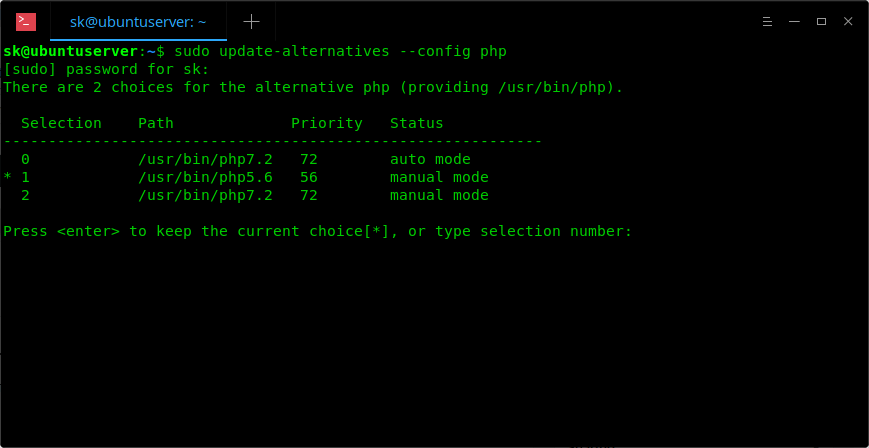
$ sudo update-alternatives --config php

1.1.5. Enter the selection number to set it as default version or simply press ENTER to keep the current choice.

Change PHP default version

1.1.6. If you have installed other PHP extensions, set them as default as well.

$ sudo update-alternatives --set phar /usr/bin/phar5.6

1.1.7. Finally, restart your Apache web server:

$ sudo systemctl restart apache2

Now, check if PHP 5.6 is the default version or not:

$ php -v

Sample output:

PHP 5.6.37-1+ubuntu18.04.1+deb.sury.org+1 (cli) 
Copyright (c) 1997-2016 The PHP Group
Zend Engine v2.6.0, Copyright (c) 1998-2016 Zend Technologies
with Zend OPcache v7.0.6-dev, Copyright (c) 1999-2016, by Zend Technologies

2. Switch from PHP 5.x to PHP 7.x

Likewise, you can switch from PHP 5.x to PHP 7.x version by running the following commands one after another.

$ sudo a2enmod php7.2
$ sudo a2dismod php5.6
$ sudo update-alternatives --set php /usr/bin/php7.2
$ sudo systemctl restart apache2

Wednesday, February 16, 2022

Code js online

 https://codesandbox.io/

Javascript/ Vue package library

https://openbase.com/ 

Image preview in vue js

 <div id="app">

  <div class="container">

    <h1>Vue.js Image Preview</h1>

    <input type="file" @change="onFileChange" accept="image/*">

    <output>

      <img :src="previewUrl" v-if="previewUrl">

      <p v-else>No image...</p>

    </output>

  </div>

</div>


var app = new Vue({
  el: '#app',
  data: {
    previewUrl: ''
  },
  methods: {
    onFileChange: function (event) {
      const file = event.target.files[0]
      if (!file) {
        return false
      }
      if (!file.type.match('image.*')) {
        return false
      }
      const reader = new FileReader()
      const that = this
      reader.onload = function (e) {
        that.previewUrl = e.target.result
      }
      reader.readAsDataURL(file)
    }
  }
})

Saturday, February 12, 2022

Vuetify Icons codepen

https://codepen.io/fferz/pen/XWpEQVB

<div id="app">

  <v-app id="inspire">

    <v-container>


    <v-dialog

    v-model="showDialog"

    :close-on-content-click="false"

    :nudge-right="40"

    transition="scale-transition"

    offset-y

    max-width="700px"

    max-height="850px"

  >

    <template v-slot:activator="{ on, attrs }">

      <v-text-field

        v-model="icon"

        :prepend-inner-icon="selectedIcon"

        label="select icon"

        v-bind="attrs"

        v-on="on"

        color="deep-purple"            

        readonly

      >

      </v-text-field>

    </template>

    <v-card>

      <v-app-bar

        color="white"

        scroll-target="#scrolling-techniques-7"

        elevation="0"

      >

        <v-text-field

          v-model="searchIcon"

          placeholder="Search icon"

          prepend-icon="mdi-magnify"

          type="text"

          onautocomplete="off"

          dense

        />

      </v-app-bar>

      <v-sheet

        id="scrolling-techniques-7"

        class="overflow-y-auto"

        max-height="600"

      >

        <v-col cols="12">

          <v-btn

            v-for="(item, i) in allIcons"

            :key="i"

            @click="saveIcon(item)"

            color="white"

            class="mr-2 mb-2 "

            fab

            small

            depressed

          >

            <v-icon color="grey darken-3"> mdi-{{ item }} </v-icon>

          </v-btn>

        </v-col>


      </v-sheet>

    </v-card>

  </v-dialog>


      </v-container>

 </v-app>

</div>


new Vue({

  el: '#app',

  vuetify: new Vuetify(),

  data(){

    return {

      showDialog: false,

      icon: '',

      searchIcon: '',

      selectedIcon: 'mdi-check-outline',

      allIcons: [

  "account",

  "account-alert",

  "account-box",

  "account-box-outline",

  "account-check",

  "account-circle",

  "account-key",

  "tooltip-account",

  "account-minus",

  "account-multiple",

  "account-multiple-outline",

  "account-multiple-plus",

  "account-network",

  "account-outline",

  "account-plus",

  "account-remove",

  "account-search",

  "account-star",

  "account-switch",

  "airballoon",

  "airplane",

  "airplane-off",

  "alarm",

  "alarm-check",

  "alarm-multiple",

  "alarm-off",

  "alarm-plus",

  "album",

  "alert",

  "alert-box",

  "alert-circle",

  "alert-octagon",

  "alpha",

  "alphabetical",

  "amazon",

  "google-cloud",

  "ambulance",

  "android",

  "android-debug-bridge",

  "android-studio",

  "apple",

  "apple-finder",

  "apple-ios",

  "apple-safari",

  "apps",

  "archive",

  "arrange-bring-forward",

  "arrange-bring-to-front",

  "arrange-send-backward",

  "arrange-send-to-back",

  "arrow-all",

  "arrow-bottom-left",

  "arrow-bottom-right",

  "arrow-collapse",

  "arrow-down",

  "arrow-down-bold",

  "arrow-down-bold-circle",

  "arrow-down-bold-circle-outline",

  "arrow-down-bold-hexagon-outline",

  "arrow-expand",

  "arrow-left",

  "arrow-left-bold",

  "arrow-left-bold-circle",

  "arrow-left-bold-circle-outline",

  "arrow-left-bold-hexagon-outline",

  "arrow-right",

  "arrow-right-bold",

  "arrow-right-bold-circle",

  "arrow-right-bold-circle-outline",

  "arrow-right-bold-hexagon-outline",

  "arrow-top-left",

  "arrow-top-right",

  "arrow-up",

  "arrow-up-bold",

  "arrow-up-bold-circle",

  "arrow-up-bold-circle-outline",

  "arrow-up-bold-hexagon-outline",

  "at",

  "attachment",

  "auto-fix",

  "auto-upload",

  "baby",

  "backburger",

  "backup-restore",

  "bank",

  "barcode",

  "barley",

  "barrel",

  "basket",

  "basket-fill",

  "basket-unfill",

  "battery",

  "battery-10",

  "battery-20",

  "battery-30",

  "battery-40",

  "battery-50",

  "battery-60",

  "battery-70",

  "battery-80",

  "battery-90",

  "battery-alert",

  "battery-charging-100",

  "battery-charging-20",

  "battery-charging-30",

  "battery-charging-40",

  "battery-charging-60",

  "battery-charging-80",

  "battery-charging-90",

  "battery-minus",

  "battery-negative",

  "battery-outline",

  "battery-plus",

  "battery-positive",

  "battery-unknown",

  "beach",

  "beaker",

  "beaker-outline",

  "beer",

  "bell",

  "bell-off",

  "bell-outline",

  "bell-ring",

  "bell-ring-outline",

  "bell-sleep",

  "beta",

  "bike",

  "binoculars",

  "bio",

  "biohazard",

  "bitbucket",

  "black-mesa",

  "blinds",

  "block-helper",

  "blogger",

  "bluetooth",

  "bluetooth-audio",

  "bluetooth-connect",

  "bluetooth-settings",

  "bluetooth-transfer",

  "blur",

  "blur-linear",

  "blur-off",

  "blur-radial",

  "bone",

  "book",

  "book-multiple",

  "book-open",

  "book-variant",

  "bookmark",

  "bookmark-check",

  "bookmark-music",

  "bookmark-outline",

  "bookmark-plus",

  "bookmark-remove",

  "border-all",

  "border-bottom",

  "border-color",

  "border-horizontal",

  "border-inside",

  "border-left",

  "border-none",

  "border-outside",

  "border-right",

  "border-top",

  "border-vertical",

  "bowling",

  "box",

  "briefcase",

  "briefcase-check",

  "briefcase-download",

  "briefcase-upload",

  "brightness-1",

  "brightness-2",

  "brightness-3",

  "brightness-4",

  "brightness-5",

  "brightness-6",

  "brightness-7",

  "brightness-auto",

  "broom",

  "brush",

  "bug",

  "bulletin-board",

  "bullhorn",

  "bus",

  "cake",

  "cake-variant",

  "calculator",

  "calendar",

  "calendar-blank",

  "calendar-check",

  "calendar-clock",

  "calendar-multiple",

  "calendar-multiple-check",

  "calendar-plus",

  "calendar-remove",

  "calendar-text",

  "calendar-today",

  "camcorder",

  "camcorder-off",

  "camera",

  "camera-front",

  "camera-front-variant",

  "camera-iris",

  "camera-party-mode",

  "camera-rear",

  "camera-rear-variant",

  "camera-switch",

  "camera-timer",

  "candycane",

  "car",

  "car-wash",

  "carrot",

  "cart",

  "cart-outline",

  "cash",

  "cash-100",

  "cash-multiple",

  "cash-usd",

  "cast",

  "cast-connected",

  "castle",

  "cat",

  "cellphone",

  "cellphone-android",

  "cellphone-dock",

  "cellphone-iphone",

  "cellphone-link",

  "cellphone-link-off",

  "cellphone-settings",

  "chair-school",

  "chart-arc",

  "chart-areaspline",

  "chart-bar",

  "chart-histogram",

  "chart-line",

  "chart-pie",

  "check",

  "check-all",

  "checkbox-blank",

  "checkbox-blank-circle",

  "checkbox-blank-circle-outline",

  "checkbox-blank-outline",

  "checkbox-marked",

  "checkbox-marked-circle",

  "checkbox-marked-circle-outline",

  "checkbox-marked-outline",

  "checkbox-multiple-blank",

  "checkbox-multiple-blank-outline",

  "checkbox-multiple-marked",

  "checkbox-multiple-marked-outline",

  "checkerboard",

  "chevron-double-down",

  "chevron-double-left",

  "chevron-double-right",

  "chevron-double-up",

  "chevron-down",

  "chevron-left",

  "chevron-right",

  "chevron-up",

  "church",

  "city",

  "clipboard",

  "clipboard-account",

  "clipboard-alert",

  "clipboard-arrow-down",

  "clipboard-arrow-left",

  "clipboard-check",

  "clipboard-outline",

  "clipboard-text",

  "clippy",

  "clock",

  "clock-fast",

  "close",

  "close-box",

  "close-box-outline",

  "close-circle",

  "close-circle-outline",

  "close-network",

  "closed-caption",

  "cloud",

  "apple-icloud",

  "cloud-check",

  "cloud-circle",

  "cloud-download",

  "cloud-outline",

  "cloud-off-outline",

  "cloud-upload",

  "cloud-refresh",

  "cloud-lock",

  "cloud-lock-outline",

  "cloud-question",

  "cloud-tags",

  "cloud-print",

  "cloud-print-outline",

  "cloud-search",

  "cloud-search-outline",

  "code-array",

  "code-braces",

  "code-equal",

  "code-greater-than",

  "code-less-than",

  "code-less-than-or-equal",

  "code-not-equal",

  "code-not-equal-variant",

  "code-string",

  "code-tags",

  "codepen",

  "coffee",

  "coffee-to-go",

  "color-helper",

  "comment",

  "comment-account",

  "comment-account-outline",

  "comment-alert",

  "comment-alert-outline",

  "comment-check",

  "comment-check-outline",

  "comment-multiple-outline",

  "comment-outline",

  "comment-plus-outline",

  "comment-processing",

  "comment-processing-outline",

  "comment-remove-outline",

  "comment-text",

  "comment-text-outline",

  "compare",

  "compass",

  "compass-outline",

  "console",

  "content-copy",

  "content-cut",

  "content-duplicate",

  "content-paste",

  "content-save",

  "content-save-all",

  "contrast",

  "contrast-box",

  "contrast-circle",

  "cow",

  "credit-card",

  "credit-card-multiple",

  "crop",

  "crop-free",

  "crop-landscape",

  "crop-portrait",

  "crop-square",

  "crosshairs",

  "crosshairs-gps",

  "crown",

  "cube",

  "cube-outline",

  "cube-unfolded",

  "cup",

  "cup-water",

  "currency-btc",

  "currency-eur",

  "currency-gbp",

  "currency-inr",

  "currency-rub",

  "currency-try",

  "currency-usd",

  "cursor-default",

  "cursor-default-outline",

  "cursor-move",

  "cursor-pointer",

  "database",

  "database-minus",

  "database-outline",

  "database-plus",

  "debug-step-into",

  "debug-step-out",

  "debug-step-over",

  "decimal-decrease",

  "decimal-increase",

  "delete",

  "delete-variant",

  "deskphone",

  "desktop-mac",

  "desktop-tower",

  "details",

  "deviantart",

  "diamond",

  "dice-1",

  "dice-2",

  "dice-3",

  "dice-4",

  "dice-5",

  "dice-6",

  "directions",

  "disqus",

  "division",

  "division-box",

  "dns",

  "domain",

  "dots-horizontal",

  "dots-vertical",

  "download",

  "drag",

  "drag-horizontal",

  "drag-vertical",

  "drawing",

  "drawing-box",

  "drone",

  "dropbox",

  "drupal",

  "duck",

  "dumbbell",

  "earth",

  "earth-off",

  "eject",

  "elevation-decline",

  "elevation-rise",

  "elevator",

  "email",

  "email-open",

  "email-outline",

  "emoticon",

  "emoticon-cool",

  "emoticon-devil",

  "emoticon-happy",

  "emoticon-neutral",

  "emoticon-poop",

  "emoticon-sad",

  "emoticon-tongue",

  "engine",

  "engine-outline",

  "equal",

  "equal-box",

  "eraser",

  "escalator",

  "evernote",

  "exclamation",

  "exit-to-app",

  "export",

  "eye",

  "eye-off",

  "eyedropper",

  "eyedropper-variant",

  "facebook",

  "facebook-messenger",

  "factory",

  "fan",

  "fast-forward",

  "ferry",

  "file",

  "file-cloud",

  "file-delimited",

  "file-document",

  "file-excel-box",

  "file-find",

  "file-image",

  "file-multiple",

  "file-music",

  "file-outline",

  "file-pdf",

  "file-pdf-box",

  "file-powerpoint",

  "file-powerpoint-box",

  "file-presentation-box",

  "file-video",

  "file-word",

  "file-word-box",

  "film",

  "filmstrip",

  "filmstrip-off",

  "filter",

  "filter-outline",

  "filter-remove-outline",

  "filter-variant",

  "fire",

  "firefox",

  "fish",

  "flag",

  "flag-checkered",

  "flag-outline",

  "flag-triangle",

  "flag-variant",

  "flash",

  "flash-auto",

  "flash-off",

  "flashlight",

  "flashlight-off",

  "flip-to-back",

  "flip-to-front",

  "floppy",

  "flower",

  "folder",

  "folder-account",

  "folder-download",

  "folder-google-drive",

  "folder-image",

  "folder-lock",

  "folder-lock-open",

  "folder-move",

  "folder-multiple",

  "folder-multiple-image",

  "folder-multiple-outline",

  "folder-outline",

  "folder-plus",

  "folder-remove",

  "folder-upload",

  "food",

  "food-apple",

  "food-variant",

  "football",

  "football-helmet",

  "format-align-center",

  "format-align-justify",

  "format-align-left",

  "format-align-right",

  "format-bold",

  "format-clear",

  "format-color-fill",

  "format-float-center",

  "format-float-left",

  "format-float-none",

  "format-float-right",

  "format-header-1",

  "format-header-2",

  "format-header-3",

  "format-header-4",

  "format-header-5",

  "format-header-6",

  "format-header-decrease",

  "format-header-equal",

  "format-header-increase",

  "format-header-pound",

  "format-indent-decrease",

  "format-indent-increase",

  "format-italic",

  "format-line-spacing",

  "format-list-bulleted",


  "format-paint",

  "format-paragraph",


  "format-size",

  "format-strikethrough",

  "format-subscript",

  "format-superscript",

  "format-text",

  "format-textdirection-l-to-r",

  "format-textdirection-r-to-l",

  "format-underline",

  "format-wrap-inline",

  "format-wrap-square",

  "format-wrap-tight",

  "format-wrap-top-bottom",

  "forum",

  "forward",

  "fridge",

  "fullscreen",

  "fullscreen-exit",

  "function",

  "gamepad",

  "gamepad-variant",

  "gas-station",

  "gavel",

  "gender-female",

  "gender-male",

  "gender-male-female",

  "gender-transgender",

  "gift",

  "git",

  "github",

  "glass-flute",

  "glass-mug",

  "glass-stange",

  "glass-tulip",

  "glasses",

  "gmail",

  "google",

  "google-chrome",

  "google-circles",

  "google-circles-communities",

  "google-circles-extended",

  "google-circles-group",

  "google-controller",

  "google-controller-off",

  "google-drive",

  "google-earth",

  "google-glass",

  "google-maps",


  "google-play",

  "google-plus",

  "google-hangouts",

  "grid",

  "grid-off",

  "group",


  "guitar-pick",

  "guitar-pick-outline",

  "hand-pointing-right",

  "hanger",


  "harddisk",

  "headphones",

  "headphones-box",

  "headphones-settings"

],

    }

  },

  methods: {

    saveIcon: function(icon) {

      this.icon = icon;

      this.selectedIcon = "mdi-" + icon;

      this.showDialog = false;

    }

  },

  watch: {

    searchIcon: function(oldSearchIcon, newSearchIcon) {

    let filteredIcons = [];

    if (this.searchIcon.length === 0) {

      filteredIcons = this.allIcons;

    } else {

      filteredIcons = this.allIcons.filter(i => i.includes(this.searchIcon));

    }

    this.allIcons = filteredIcons;

  }

  }

}) 

Monday, January 31, 2022

vue js Page Not Updating in Vue

Foreword: vue-router handover is different from traditional page handover. The switching between routes is actually the switching between components, not the real page switching. This will also lead to a problem, that is, when referring to the same component, it will lead to the component can not be updated, that is, the page in our mouth can not be updated.

I. Problem Presentation

Switching results in routing

At this time, it will be found that the value of the input tag does not change with the change of routing. No updates

II. Solutions

Add a different key value to <router-view:key="key"> </router-view> so that vue recognizes that this is a different <router-view>.

Switching results in routing

At this point, the routing will be updated. But this also means that each < router-view > needs to be bound to a key value. If I jump from page1 to page2 with different components, I really don't have to worry about component updates.

3. Solutions 2

Add a different V-IF value to <router-view v-if="router Alive"> </router-view> to destroy <router-link> and then recreate <router-link> to refresh the page.

Because router-link components have cancel click events, here. native is to trigger events in the component's native tag.

(2) The usage of this. $nextTick (()=> {}) is to wait for this.routerAlive = false; to execute this.routerAlive = true after triggering; thus to destroy and recreate.

Fourth, the extension of solution 2 triggers the refresh of routing within the routing.

Scheme 1, Scheme 2 updates the routing through the outside of the routing. What if you want to update the routing from the inside of the routing?

 1 <!-- App.vue Root Component Code -->
 2 <template>
 3   <div class="app">
 4       <div class="slide">
 5           <ul>
 6               <li><router-link to="/page1/freddy" >freddy</router-link></li>    
 7               <li><router-link to="/page1/nick" >nick</router-link></li>    
 8               <li><router-link to="/page1/mike" >mike</router-link></li>    
 9           </ul>    
10       </div>
11       <div class="content">
12              <router-view v-if="routerAlive"></router-view>
13       </div>
14   </div>
15 </template>
16  
17 <script>
18     export default{
19     data(){
20         return {
21         routerAlive:true
22         }
23     },
24     provide(){    //Create properties in parent components
25             return {
26                 routerRefresh: this.routerRefresh
27             }
28         },
29     methods:{
30         routerRefresh(){
31             this.routerAlive = false;
32         this.$nextTick(()=>{
33             this.routerAlive = true;
34         });
35         }
36     }
37     }
38 </script>
 1 <!-- assembly Page1 Code -->
 2 <template>
 3     <div class="page-1">
 4         Name:<input type="text" v-model="value"><br/>
 5         <button @click="linkToNick1">Jump To nick,No refresh routing</button>
 6         <button @click="linkToNick2">Jump To nick,And refresh routing</button>
 7         <br/>
 8         <button @click="linkToSelf1">Jump to itself,No refresh routing</button>
 9         <button @click="linkToSelf2">Refresh itself</button>
10     </div>
11 </template>
12 <script type="text/javascript">
13     export default {
14     name:'page1',
15     inject:['routerRefresh'],   //Injecting attributes created in parent components into child components
16     mounted(){
17         this.value = this.$route.params.name;
18     },
19     data(){
20         return {
21             value:''
22         }
23     },
24     methods:{
25         linkToNick1(){
26         this.$router.push('/page1/nick');
27         },
28         linkToSelf1(){
29         this.$router.push('/page1/freddy');
30         },
31         linkToNick2(){
32         this.$router.push('/page1/nick');
33         this.routerRefresh();
34         },
35         linkToSelf2(){
36         this.routerRefresh();
37         }
38     }
39     }
40 </script>
41  
42 <style type="text/css">
43     button { margin-top:10px;}
44         button:hover { background:#ff9500; }
45 </style>

(1) When we click "jump to nick, do not refresh the routing", we will find that the value of input has not changed.

(2) When we click "jump to nick and refresh the routing", the value of input has changed.

(3) When we enter some values randomly in the input, and then click "jump to itself, do not refresh the routing", we will find that the contents of the input are not refreshed.

(4) Click refresh itself can trigger refresh routing, is it very practical?